Showing posts with label Android Phone features. Show all posts
Showing posts with label Android Phone features. Show all posts
Tuesday, 15 May 2012
Procedure to Update Stable ICS 4.0.4 Firmware on Motorola Defy Plus
You have seen that Motorola defy users are enjoying the benefit
of ICS 4.0.4 firmware, now the same benefits can also be enjoyed by Motorola Defy Plus users. if you are on the rooted firmware then only
you can apply for this Update. There is
no official firmware release and we don’t have any ETA on Official ICS Update.
As mentioned above in this article, to apply this update one should root the device but when
device is rooted the warranty will get void. You can revoke the root access is by reapplying the Official
Update. Here we are cross checking the pre requisites one should follow for
installing this update.
Disclaimer:
We are not responsible for any damage happened to your device in the process of
following the instructions steps mentioned in this article. It’s very unlikely
that there will be any issues however we will try to help you at our best.
Issues:
· when switching between tabs there is a possibility of Stock browser crashes
· when switching between tabs there is a possibility of Stock browser crashes
Working perfectly:
· Phone
· Camera
· SMS
· Multi boot( Need to flash multi boot mod of course)
· Themes
· HWA is enabled for all apps(build. prop hwui. whitelist set to 0)
· ADB debugging should be disabled.
· Phone
· Camera
· SMS
· Multi boot( Need to flash multi boot mod of course)
· Themes
· HWA is enabled for all apps(build. prop hwui. whitelist set to 0)
· ADB debugging should be disabled.
Stand
Out Features:
· Camera Panorama
· Network Usage Stats
· Face Detection
· Chrome
· Camera Panorama
· Network Usage Stats
· Face Detection
· Chrome
Working
but with bugs:
· For most of the users flash player is now working in browser
· Chrome can be made to work using chainfire3d
· Air Twist (streaming through wi fi) of double twist player. Enabling it in wi fi disconnects internet.
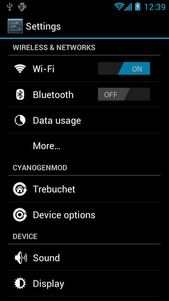
Here is the screen shot of ICS 4.0.4 on Motorola Defy Plus
· For most of the users flash player is now working in browser
· Chrome can be made to work using chainfire3d
· Air Twist (streaming through wi fi) of double twist player. Enabling it in wi fi disconnects internet.
Here is the screen shot of ICS 4.0.4 on Motorola Defy Plus


Pre
Requisites:
·
Please back up all your data like SMS Data, Contacts, Call Logs,
Songs Videos and Files in your Motorola Defy Plus because just in case if the
data get corrupted or Lost then same can be restored with below given steps.
Please be informed that Data backed up with the help of PC Suits does not support by the Custom ROM firmwares..
SMS –
Use “SMS Backup & Restore app”,
Contacts – Sync with the Gmail application,
Call Log - Call Log and Restore
Songs, Videos, Files – Copy to internal / External SD Card,
APN and MMS Settings – “Applications > Settings > Wireless and Network > Mobile Networks > Access Point Names”
Contacts – Sync with the Gmail application,
Call Log - Call Log and Restore
Songs, Videos, Files – Copy to internal / External SD Card,
APN and MMS Settings – “Applications > Settings > Wireless and Network > Mobile Networks > Access Point Names”
·
It is advisable to disable all your anti-virus suits in your
Device and Computer. There are chances that tends to interrupt the process of
firmware update.
·
As matter of precaution the device charge level should be more than
60% so as to ensure that Defy Plus
does not get turned off while in the process of firmware update.
·
Here is the path to enable the USB debugging on your device
“Settings > Applications > Development > USB debugging”. Then USB
Debugging option should be checked.
Steps
to Update Motorola Defy+ with Ice Cream Sandwich 4.0.4 Firmware:
·
Download Ice Cream Sandwich from Motorola Defy+ & Google
Apps on your computer.
·
Connect your Motorola Defy Plus to Computer. We are placing the
two downloaded zip files in your Defy Plus SD Card. Make sure that you
are not placing the file deep into the device or else device may get spoil.
·
To start in recovery mode you need to turn off the device. By
Pressing and holding the Volume Down button the Motorola Defy Plus can be
entered into the recovery mode and turn ON the device by pressing the Power button.
·
In the next step, select “install zip from sd card” > “choose
zip from sd card” > Ice Cream Sandwich 4.0.4 Firmware Package and press the
Power button to confirm the same.
·
Once this update is successfully applied then the device either
go back to recovery mode or you need to select “----- Go Back -----” and select
the option of “reboot system now” for rebooting the phone.
Note: If
the Motorola Defy plus get in Boot Loop mode then you need to take out the
battery and reinsert the battery and
start over the whole process from the beginning so as to apply the firmware
Just in case If you have any questions regarding this please
mention your comments in the comment section, we will try to respond at the
earliest.
01:38 0
Wednesday, 9 May 2012
How Samsung transmuted to the best year by year - Revolution from Galaxy S to Galaxy S III
Samsung transformed to the best Every year and journey from Galaxy S to Galaxy S III within a short span is remarkable. Here we are listing out the revolutionary changes of Samsung Galaxy Mobile
March 2010
At the time of March 2010 the samsung had competition with Apple Iphone and few other mobile manfactures like HTC and Blackberry. this competition began with samsung Galaxy s, it came with the 1GHz processor, 5 megapixel camera and the 4 inch super AMOLED touchscreen. each network provider launched their own variant of the Galaxy s with their own name
 By end of December 2010 the sales of Galaxy reached over 20 million, this increased the expectation of the next level Samsung Galaxy s series.
February 2011
Yet another revolution in the smartphone industry at that time, The samsung Galaxy s II came in with the dual core 1.2 GHz processor, 4.3 inch Super AMOLED plus Display and the 8 - Megapixel camera. it was the best selling Smartphone.
Rockstar The Galaxy S II in just 5 month reached to the record level sales count of 10 Million devices. The specifications and add on features of the S II were more then enough to beat the newly entering killer iPhone 4S from Apple.

Accomplishments and Awards:
In the Mobile World Congress conference 2012 held at Barcelona the Galaxy S II was awarded as best smartphone and samsung won the device manufacturer of the year.
May 2012
The Next Galaxy launch, the Samsung Galaxy S III.
There are more expectation from this smartphone and expecting it reach the recorded sales count of 10 million devices less then 5 months time span.
The next generation samsung smartphone would be Galaxy S III, it will comes with the 8-Megapixel camera, the 4.8-inch 720p screen with the Super AMOLED display and the 1.4GHz Quad-core Exynos processor. There are couple of new features and specs that Samsung has brought in the Galaxy S III.
March 2010
At the time of March 2010 the samsung had competition with Apple Iphone and few other mobile manfactures like HTC and Blackberry. this competition began with samsung Galaxy s, it came with the 1GHz processor, 5 megapixel camera and the 4 inch super AMOLED touchscreen. each network provider launched their own variant of the Galaxy s with their own name
- Samsung Vibrant (SGH-T959) was launched by T-Mobile.
- Samsung Galaxy S 4G (SGH-T959V) was launched Soon after vibrant launch by T-mobile.
- Samsung Captivate (SGH-I897) was launched by AT&T
- Apart from T- mobile Sprint was another network providers which launched the 4G LTE services and they launched straight away with the 4G version of Galaxy S, variant named the Samsung Epic 4G (SPH-D700).
- Soon after that, Verizon came out with the Samsung Fascinate (SCH-I500) on Sep 9th 2010
- US Cellular came up with the Samsung Mesmerize on 27th October 2010
- C Spire Wireless launched the Samsung Showcase (SCH-I500)
- Samsung Galaxy Indulge - 4G was launched in the USA market by MetroPCS.

February 2011
Yet another revolution in the smartphone industry at that time, The samsung Galaxy s II came in with the dual core 1.2 GHz processor, 4.3 inch Super AMOLED plus Display and the 8 - Megapixel camera. it was the best selling Smartphone.
Rockstar The Galaxy S II in just 5 month reached to the record level sales count of 10 Million devices. The specifications and add on features of the S II were more then enough to beat the newly entering killer iPhone 4S from Apple.

Accomplishments and Awards:
In the Mobile World Congress conference 2012 held at Barcelona the Galaxy S II was awarded as best smartphone and samsung won the device manufacturer of the year.
May 2012
The Next Galaxy launch, the Samsung Galaxy S III.
There are more expectation from this smartphone and expecting it reach the recorded sales count of 10 million devices less then 5 months time span.
The next generation samsung smartphone would be Galaxy S III, it will comes with the 8-Megapixel camera, the 4.8-inch 720p screen with the Super AMOLED display and the 1.4GHz Quad-core Exynos processor. There are couple of new features and specs that Samsung has brought in the Galaxy S III.
The Journey > Galaxy S to Galaxy S II to Galaxy S III
22:04 0
Tuesday, 8 May 2012
Steps to Extract RSS / Atom Feed of any Website on Android Browser
As you all know Web feeds are so essential specially so called users are News readers or the Feed Readers. In general the feeds have unique URL for each feed and this will allow users to know the new content on website periodically.
While browsing on the web, it’s very easy to find the feed or RSS URL of a site but it is tougher job when you are working on your phone
Steps to Install Extract RSS Feed & Know Feed URL

The Feed extractor Android application can be very easily downloaded to any of the Android Mobie phones and tablets. visit Android Apps Labs Page listing of Extract Feed Application and then click on install. Now this process completes the installation. No further steps required.
Now when you are browsing along you need to open the site and right click to find the RSS or feed URL.
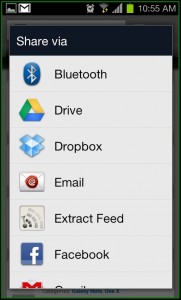
Finding it is very easy, simply tap on Share by selecting Menu and you will take you to the option of ‘Extract Feed’.
When you click/tap on it, you will automatically take you to the feed URL and this what you require.

How to Download Extract Feed Application
Extract Feed can be freely downloaded from Android Apps Labs. you need to visit the android Apps Labs Page of Extract Feed then click on install will directly download this application on to your Android Mobile Phone. Download will automatically proceed with installtion process.
In Addition, you can download Extract Feed using the QR code given below -

23:04 0
Tuesday, 1 May 2012
Sprint network Android Phones took a place in Top Smartphones List
Today we got an opportunity to talk about Sprint, it is one of the Leading Mobile carriers in USA and here we have listed the Top Smartphones available on this network. Mobile Devices comes with 3G or 4G support and customers have number of choices
S 11 Epic Touch 4G - Samsung Galaxy
 It gives the best entertainment with 1.2 GHz dyak core processor and has highend display Quality.
Samsung Galaxy s II Epic Touch 4G features given below
1. 1.2 Giga hz dual core processor
2. 8 M pixel camera
3. 1800 mAh battery
4. 16 Gigabyte internal memory
5. Android 2.3 Gingerbread OS
6. HD video recording
7. 4.5 inches AMOLED Plus display
Evo 3D 4G made by HTC
Smartphone History Evo 3d 4G is the first Smartphone with 4G introduced in united states and this superiror phone comes with 4.3 inches 3D display which can play , record and capture the 3d with videos without any glasses
 Here are the features :
1. 1.2 Ghz dual core processor
2. 3D videos
3. Video Chat
4. Android 2.3 Gingerbread OS
5. 4.3 inches 3D qHD display
6. GPS
7. 5 mega pixel rear side camera
8. 1.3 mega pixel front facing
Samsung Transform
it is revolution in mobile device is called Samsung Transform, it is a sleek device which comes with number of features like full slide out QWERTY layout keypad along with 3 mega pixel camera, 3.5 inches touchscreen display and front VGA camera which can be used for 3G video calls and video chat.
 Samsung Transform features –
1. 3.5 inches touchscreen display
2. 1 Ghz processor
3. 2 Gb internal memory
4. Android 2.3 Gingerbread OS
5. VGA front camera
6. QWERTY layout keypad
7. 3 mega pixel camera
LG Marquee

LG Marquee is a sleek, slim and Android based smartphone comes with 5 mega pixel camera, 4 inches NOVA display touchscreen and has 1 Ghz processor front facing 2 mega pixel camera.
LG Marquee Mobile Device features –
1. Android 2.3 Gingerbread OS
2. 1 Ghz single core processor
3. 5 mega pixel camera
4. Front facing 2 mega pixel camera
5. HD video recording
6. 4 inches touchscreen display
S 11 Epic Touch 4G - Samsung Galaxy
Samsung Galaxy s II Epic Touch 4G features given below
1. 1.2 Giga hz dual core processor
2. 8 M pixel camera
3. 1800 mAh battery
4. 16 Gigabyte internal memory
5. Android 2.3 Gingerbread OS
6. HD video recording
7. 4.5 inches AMOLED Plus display
Evo 3D 4G made by HTC
Smartphone History Evo 3d 4G is the first Smartphone with 4G introduced in united states and this superiror phone comes with 4.3 inches 3D display which can play , record and capture the 3d with videos without any glasses
1. 1.2 Ghz dual core processor
2. 3D videos
3. Video Chat
4. Android 2.3 Gingerbread OS
5. 4.3 inches 3D qHD display
6. GPS
7. 5 mega pixel rear side camera
8. 1.3 mega pixel front facing
Samsung Transform
it is revolution in mobile device is called Samsung Transform, it is a sleek device which comes with number of features like full slide out QWERTY layout keypad along with 3 mega pixel camera, 3.5 inches touchscreen display and front VGA camera which can be used for 3G video calls and video chat.
 Samsung Transform features –
1. 3.5 inches touchscreen display
2. 1 Ghz processor
3. 2 Gb internal memory
4. Android 2.3 Gingerbread OS
5. VGA front camera
6. QWERTY layout keypad
7. 3 mega pixel camera
LG Marquee

LG Marquee is a sleek, slim and Android based smartphone comes with 5 mega pixel camera, 4 inches NOVA display touchscreen and has 1 Ghz processor front facing 2 mega pixel camera.
LG Marquee Mobile Device features –
1. Android 2.3 Gingerbread OS
2. 1 Ghz single core processor
3. 5 mega pixel camera
4. Front facing 2 mega pixel camera
5. HD video recording
6. 4 inches touchscreen display
23:56 0
Subscribe to:
Posts (Atom)


