Showing posts with label Android browser. Show all posts
Showing posts with label Android browser. Show all posts
Wednesday, 9 May 2012
How Samsung transmuted to the best year by year - Revolution from Galaxy S to Galaxy S III
Samsung transformed to the best Every year and journey from Galaxy S to Galaxy S III within a short span is remarkable. Here we are listing out the revolutionary changes of Samsung Galaxy Mobile
March 2010
At the time of March 2010 the samsung had competition with Apple Iphone and few other mobile manfactures like HTC and Blackberry. this competition began with samsung Galaxy s, it came with the 1GHz processor, 5 megapixel camera and the 4 inch super AMOLED touchscreen. each network provider launched their own variant of the Galaxy s with their own name
 By end of December 2010 the sales of Galaxy reached over 20 million, this increased the expectation of the next level Samsung Galaxy s series.
February 2011
Yet another revolution in the smartphone industry at that time, The samsung Galaxy s II came in with the dual core 1.2 GHz processor, 4.3 inch Super AMOLED plus Display and the 8 - Megapixel camera. it was the best selling Smartphone.
Rockstar The Galaxy S II in just 5 month reached to the record level sales count of 10 Million devices. The specifications and add on features of the S II were more then enough to beat the newly entering killer iPhone 4S from Apple.

Accomplishments and Awards:
In the Mobile World Congress conference 2012 held at Barcelona the Galaxy S II was awarded as best smartphone and samsung won the device manufacturer of the year.
May 2012
The Next Galaxy launch, the Samsung Galaxy S III.
There are more expectation from this smartphone and expecting it reach the recorded sales count of 10 million devices less then 5 months time span.
The next generation samsung smartphone would be Galaxy S III, it will comes with the 8-Megapixel camera, the 4.8-inch 720p screen with the Super AMOLED display and the 1.4GHz Quad-core Exynos processor. There are couple of new features and specs that Samsung has brought in the Galaxy S III.
March 2010
At the time of March 2010 the samsung had competition with Apple Iphone and few other mobile manfactures like HTC and Blackberry. this competition began with samsung Galaxy s, it came with the 1GHz processor, 5 megapixel camera and the 4 inch super AMOLED touchscreen. each network provider launched their own variant of the Galaxy s with their own name
- Samsung Vibrant (SGH-T959) was launched by T-Mobile.
- Samsung Galaxy S 4G (SGH-T959V) was launched Soon after vibrant launch by T-mobile.
- Samsung Captivate (SGH-I897) was launched by AT&T
- Apart from T- mobile Sprint was another network providers which launched the 4G LTE services and they launched straight away with the 4G version of Galaxy S, variant named the Samsung Epic 4G (SPH-D700).
- Soon after that, Verizon came out with the Samsung Fascinate (SCH-I500) on Sep 9th 2010
- US Cellular came up with the Samsung Mesmerize on 27th October 2010
- C Spire Wireless launched the Samsung Showcase (SCH-I500)
- Samsung Galaxy Indulge - 4G was launched in the USA market by MetroPCS.

February 2011
Yet another revolution in the smartphone industry at that time, The samsung Galaxy s II came in with the dual core 1.2 GHz processor, 4.3 inch Super AMOLED plus Display and the 8 - Megapixel camera. it was the best selling Smartphone.
Rockstar The Galaxy S II in just 5 month reached to the record level sales count of 10 Million devices. The specifications and add on features of the S II were more then enough to beat the newly entering killer iPhone 4S from Apple.

Accomplishments and Awards:
In the Mobile World Congress conference 2012 held at Barcelona the Galaxy S II was awarded as best smartphone and samsung won the device manufacturer of the year.
May 2012
The Next Galaxy launch, the Samsung Galaxy S III.
There are more expectation from this smartphone and expecting it reach the recorded sales count of 10 million devices less then 5 months time span.
The next generation samsung smartphone would be Galaxy S III, it will comes with the 8-Megapixel camera, the 4.8-inch 720p screen with the Super AMOLED display and the 1.4GHz Quad-core Exynos processor. There are couple of new features and specs that Samsung has brought in the Galaxy S III.
The Journey > Galaxy S to Galaxy S II to Galaxy S III
22:04 0
Tuesday, 8 May 2012
Steps to Extract RSS / Atom Feed of any Website on Android Browser
As you all know Web feeds are so essential specially so called users are News readers or the Feed Readers. In general the feeds have unique URL for each feed and this will allow users to know the new content on website periodically.
While browsing on the web, it’s very easy to find the feed or RSS URL of a site but it is tougher job when you are working on your phone
Steps to Install Extract RSS Feed & Know Feed URL

The Feed extractor Android application can be very easily downloaded to any of the Android Mobie phones and tablets. visit Android Apps Labs Page listing of Extract Feed Application and then click on install. Now this process completes the installation. No further steps required.
Now when you are browsing along you need to open the site and right click to find the RSS or feed URL.
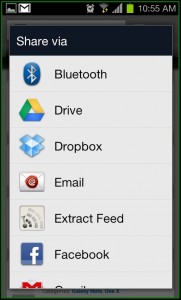
Finding it is very easy, simply tap on Share by selecting Menu and you will take you to the option of ‘Extract Feed’.
When you click/tap on it, you will automatically take you to the feed URL and this what you require.

How to Download Extract Feed Application
Extract Feed can be freely downloaded from Android Apps Labs. you need to visit the android Apps Labs Page of Extract Feed then click on install will directly download this application on to your Android Mobile Phone. Download will automatically proceed with installtion process.
In Addition, you can download Extract Feed using the QR code given below -

23:04 0
Subscribe to:
Posts (Atom)


